
Crear tu base de conocimiento
La base de conocimiento es cómo tu agente sabe qué responder. Sin ella, las respuestas son genéricas. Con ella, tu agente responde preguntas específicas sobre tus productos, políticas, precios y procesos.
Rastreo del sitio web
Sección titulada «Rastreo del sitio web»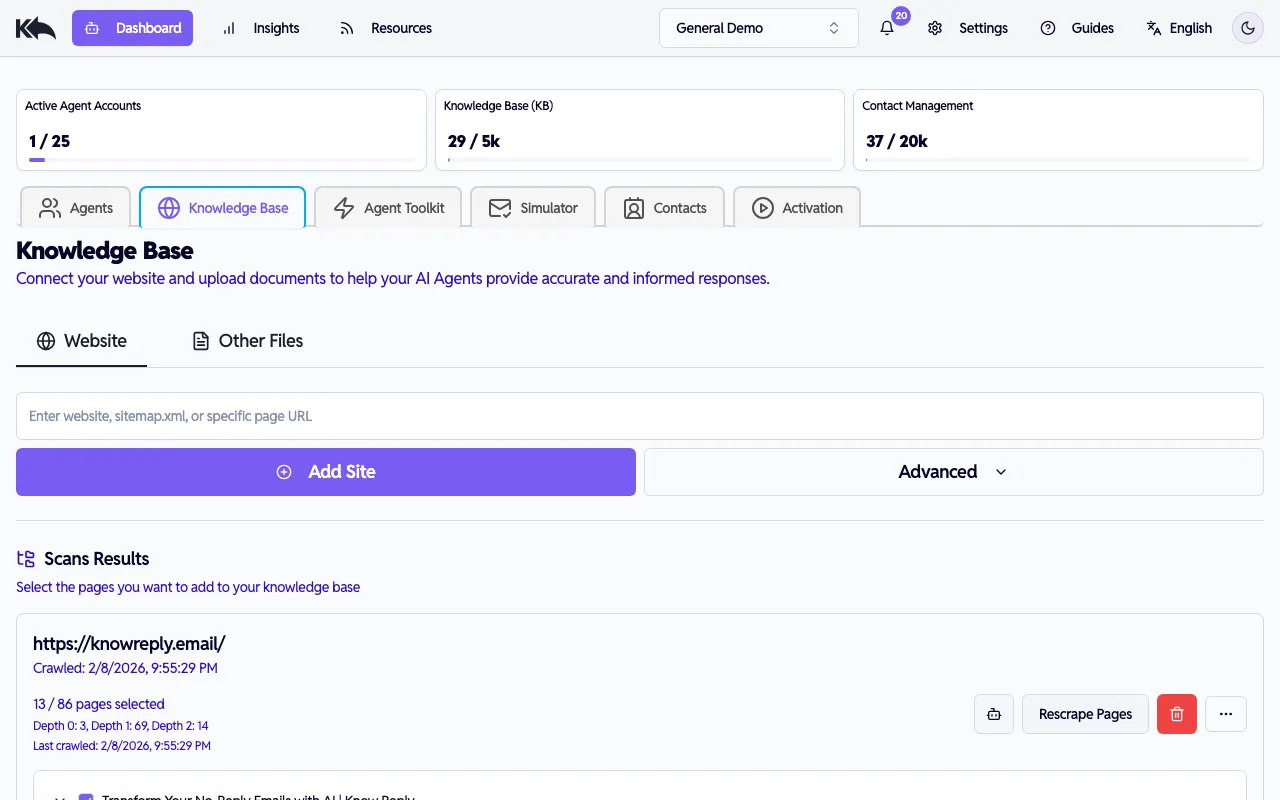
La forma más rápida de construir tu base de conocimiento:
- Ve a la pestaña Dashboard > Knowledge Base > Website
- Ingresa la URL de tu sitio web
- Haz clic en Add Site para iniciar el rastreo
El rastreador hará lo siguiente:
- Descubrir y mapear la estructura de tu sitio
- Clasificar páginas por relevancia
- Extraer contenido de cada página
- Capturar el tono y la terminología de tu marca
Estado del rastreo
Sección titulada «Estado del rastreo»Sigue el progreso mientras se procesa tu sitio:
- Queued - Esperando para iniciar
- Analyzing - Descubriendo páginas
- Ranking - Priorizando contenido
- Scanning - Extrayendo texto
- Pages Ready - Contenido disponible
- Completed - Todo finalizado
Opciones avanzadas
Sección titulada «Opciones avanzadas»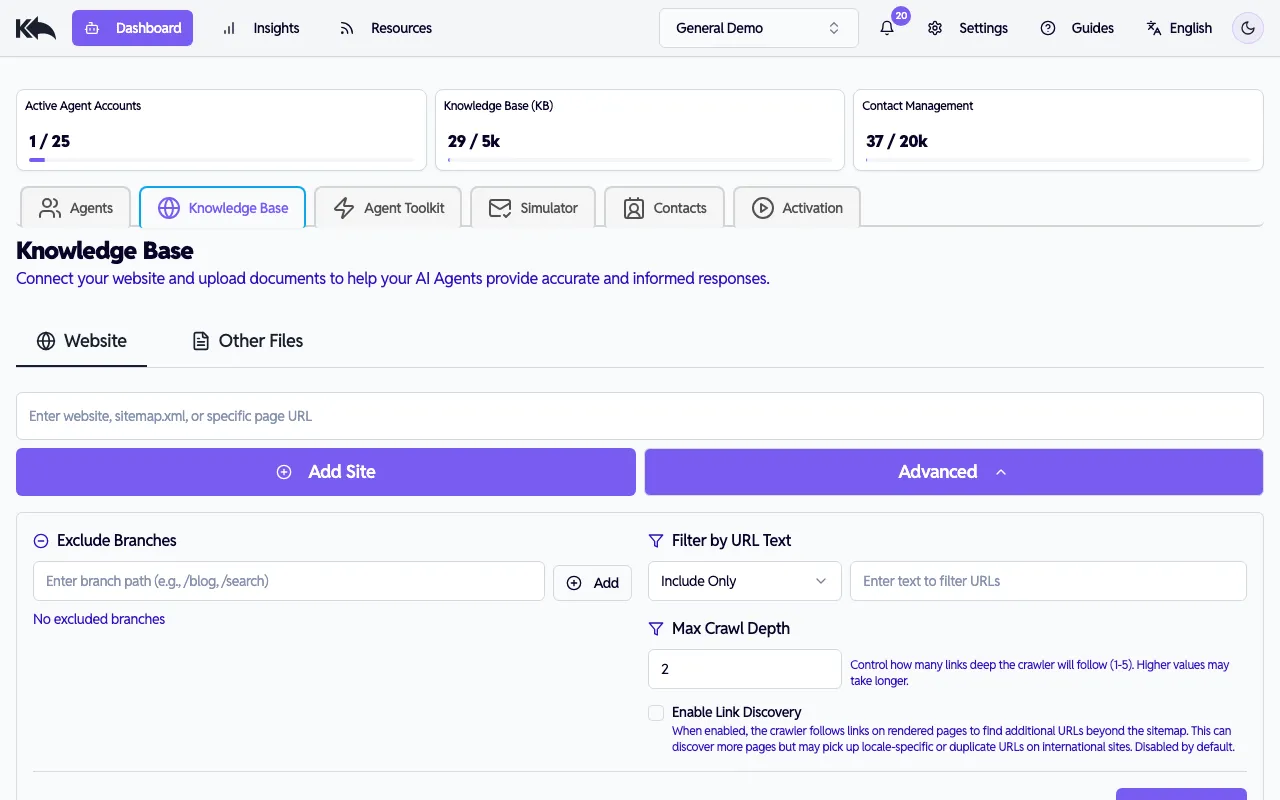
Haz clic en Advanced Options para personalizar el rastreo:
- Exclude Branches — omite ciertas rutas de URL (por ejemplo,
/admin,/login) - URL Filter — incluye solo o excluye URLs que coincidan con un patrón de texto (por ejemplo,
/blog,/help) - Max Depth — cuántos niveles de profundidad rastrear (1–5, por defecto 2)
- Enable Link Discovery — cuando está activado, el rastreador sigue enlaces en páginas renderizadas para encontrar URLs fuera del sitemap. Esto puede descubrir páginas no listadas, pero también puede incluir URLs específicas de idioma o duplicadas en sitios internacionales. Desactivado por defecto.
- Sitemap URL — especifica una URL directa a un archivo sitemap.xml. Déjalo en blanco para autodetectar.
Seleccionar páginas
Sección titulada «Seleccionar páginas»Después del rastreo, verás una vista en árbol de páginas descubiertas. Marca las casillas de las páginas que quieras incluir y haz clic en Save para agregarlas a tu base de conocimiento.
Re-rastrear
Sección titulada «Re-rastrear»Si un rastreo falla o tu contenido cambia, haz clic en Recrawl para ejecutarlo de nuevo.
Carga de archivos
Sección titulada «Carga de archivos»Para contenido que no está en tu sitio web:
- Ve a la pestaña Dashboard > Knowledge Base > Other Files
- Sube tus documentos
- El sistema extrae texto y lo agrega al conocimiento buscable
Buenas opciones: SOPs, políticas internas, especificaciones de producto y materiales de capacitación.
Respuestas de FAQ desde preguntas de clientes
Sección titulada «Respuestas de FAQ desde preguntas de clientes»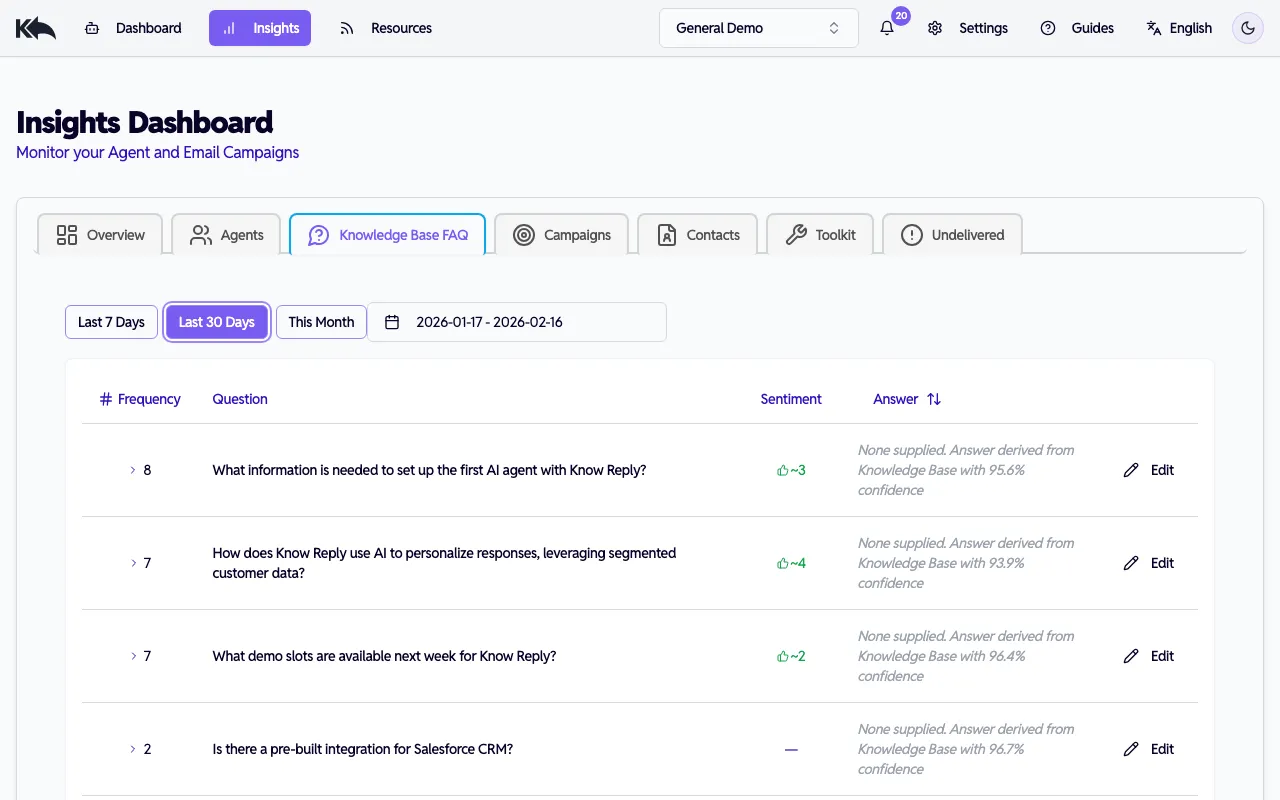
A medida que tu agente maneja correos reales, Know Reply agrupa automáticamente preguntas similares de respuestas de clientes en FAQs. Puedes revisarlas en Insights > Knowledge Base FAQ.
El reporte muestra:
- Preguntas comunes agrupadas por tema
- Con qué confianza tu IA responde cada una
- Qué preguntas tienen brechas en tu base de conocimiento
- Feedback de clientes — valoraciones positivas y negativas aproximadas de los destinatarios
FAQs con bajo rendimiento
Sección titulada «FAQs con bajo rendimiento»Las FAQs que reciben 3 o más respuestas negativas en los últimos 30 días se resaltan con fondo ámbar y un ícono de alerta. Son las respuestas que más necesitan mejora.
Revisar y mejorar respuestas
Sección titulada «Revisar y mejorar respuestas»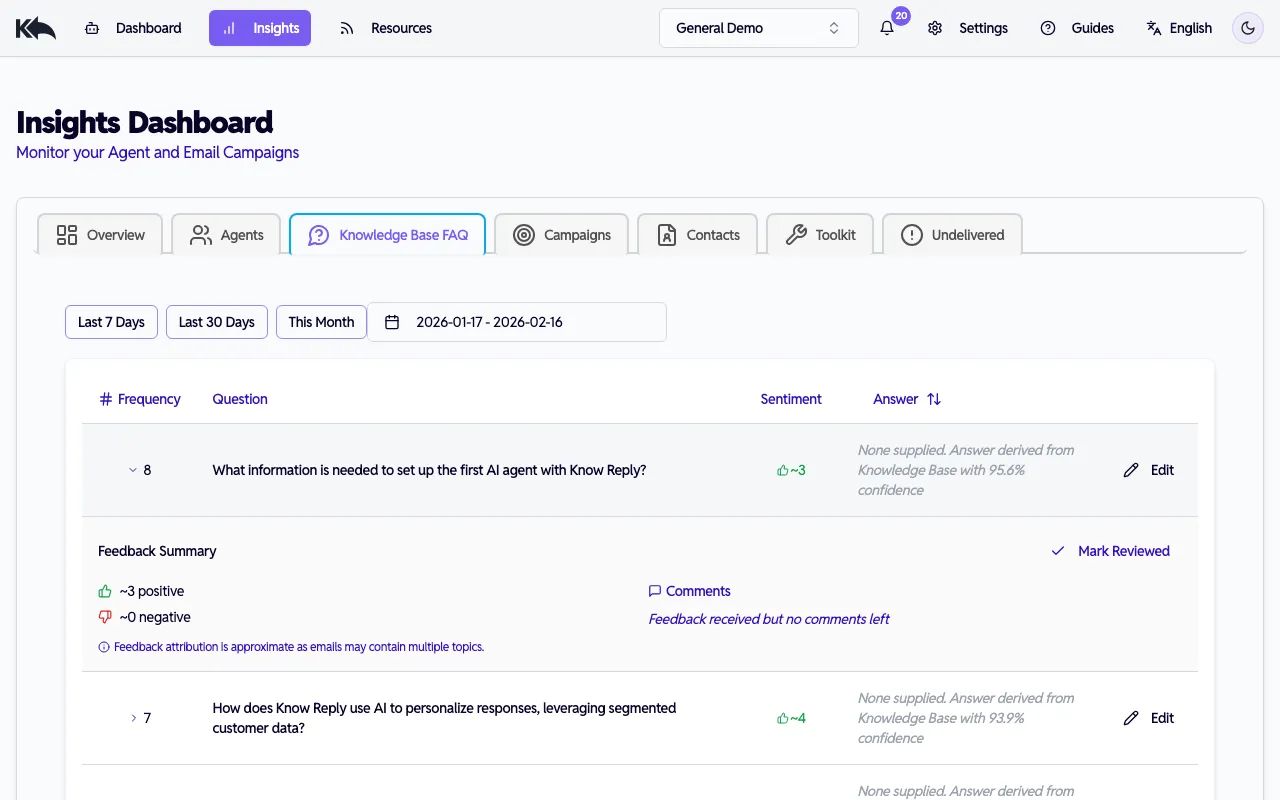
Haz clic en cualquier fila de FAQ para expandirla y ver:
- Un resumen de feedback con conteos positivos/negativos (y cuántos son nuevos desde tu última revisión)
- Comentarios de clientes divididos en secciones “New” y “Reviewed”
- Un botón Edit para actualizar la respuesta en línea — al guardar se marca automáticamente como revisada y se encola el contenido para re-embedding
- Un botón Mark Reviewed para reconocer feedback sin cambiar la respuesta
Cuando detectes una pregunta que la IA no maneja bien, puedes agregar tu propia respuesta directamente desde el reporte. Esa respuesta se guarda en tu base de conocimiento y se usa en futuras respuestas.
Cómo funciona la recuperación
Sección titulada «Cómo funciona la recuperación»Cuando llega un correo, el sistema encuentra el contenido más relevante, no solo por coincidencia de palabras clave, sino por significado. Si un cliente pregunta “¿cómo devuelvo algo?”, encontrará tu “política de reembolsos y cambios” aunque no coincidan exactamente las palabras.
Estrategia de embeddings
Sección titulada «Estrategia de embeddings»Cada pieza de contenido que agregas usa knowledge embeddings: tu plan determina cuántos tienes. Piensa en los embeddings como la capacidad total de conocimiento de tu IA.
Qué incrustar primero
Sección titulada «Qué incrustar primero»Comienza con contenido que responda directamente preguntas de clientes:
- Tu sitio web — rastrea el sitio principal para información de productos, precios y políticas
- Contenido FAQ — agrega las preguntas que tu equipo de soporte responde repetidamente
- Políticas clave — devoluciones, envíos, cancelaciones y garantías
Cuándo usar carga de archivos
Sección titulada «Cuándo usar carga de archivos»Sube materiales internos que no estén en tu sitio web:
- SOPs y guías de proceso — cómo tu equipo maneja situaciones comunes
- Especificaciones y fichas técnicas — información técnica detallada
- Materiales de capacitación — documentos de onboarding que capturan conocimiento institucional
- Políticas internas — lineamientos de RR. HH., cumplimiento u operación
Formatos compatibles: PDF, DOCX, TXT, Markdown e imágenes (JPEG, PNG con extracción de texto).
Organización con grupos de documentos
Sección titulada «Organización con grupos de documentos»Agrupa contenido relacionado y controla qué agentes acceden a cada grupo. Un agente de ventas puede necesitar especificaciones y precios, mientras que uno de soporte necesita guías de troubleshooting y políticas de devolución.
Escalar tu conocimiento
Sección titulada «Escalar tu conocimiento»A medida que tu negocio crece, necesitarás más embeddings para cubrir nuevos productos, servicios y temas:
| Plan | Embeddings | Ideal para |
|---|---|---|
| Free | 20 | Pruebas con unas pocas páginas clave |
| Starter | 100 | Sitio de una pequeña empresa y documentos principales |
| Pro | 1,000 | Múltiples líneas de producto y documentación detallada |
| Premium | 5,000 | Catálogos grandes y bases de conocimiento extensas |
| Enterprise | Unlimited | Bibliotecas de contenido a escala empresarial |
Consejos
Sección titulada «Consejos»- Calidad sobre cantidad - 50 respuestas bien escritas superan a 500 páginas de texto repetitivo
- Revisa el reporte FAQ — ve a Insights > Knowledge Base FAQ para ver qué preguntas le cuestan a tu IA. Las FAQs con bajo rendimiento (3+ respuestas negativas) se resaltan. Revisa comentarios de clientes, edita respuestas en línea y márcalas como revisadas
- Usa control de acceso por agente - no le des a cada agente acceso a todo. Un agente enfocado con conocimiento relevante rinde mejor que uno saturado de contenido irrelevante
Mantenerla actualizada
Sección titulada «Mantenerla actualizada»Vuelve a rastrear tu sitio después de cambios importantes de contenido. Sube nuevos documentos a medida que se creen. Tu agente siempre usará el contenido más reciente.