
Reply Modes
Know Reply has two reply modes. Auto-send (paid plans) lets your AI reply to customers instantly without human involvement. Draft review (Free tier) holds every reply for your approval before sending. This is the single biggest difference between the Free tier and paid plans.
Auto-send mode
Section titled “Auto-send mode”Available on Starter, Pro, Premium, and Enterprise plans.
In auto-send mode, the AI sends replies automatically when it can handle the conversation. When it can’t, it escalates to you instead. Your customers get fast, accurate replies, often within seconds, without you lifting a finger.
How it works
Section titled “How it works”- A customer email arrives
- The AI generates a reply and evaluates whether it can handle the request
- Can handle it: the reply sends immediately, no human needed
- Needs help: the AI escalates to you or asks the customer a clarifying question
What triggers escalation instead of auto-send
Section titled “What triggers escalation instead of auto-send”The AI holds back and escalates when:
- The question falls outside your knowledge base
- The customer is upset or the situation is sensitive
- The request involves an action the AI can’t take
- The email matches one of your escalation rules
What your customers experience
Section titled “What your customers experience”Customers get fast, personalized replies, often within seconds of sending their email. They don’t know or care whether a human or AI wrote it. When the AI escalates, your team picks up the conversation seamlessly.
Draft review mode
Section titled “Draft review mode”The default (and only) mode on the Free tier.
In draft review mode, every AI reply is held for your approval before sending. Nothing goes out without you seeing it first.
How it works
Section titled “How it works”- A customer email arrives
- The AI generates a draft reply
- You receive a notification email showing the original message and the AI’s draft
- You review the draft and approve, edit, or discard it
The review queue
Section titled “The review queue”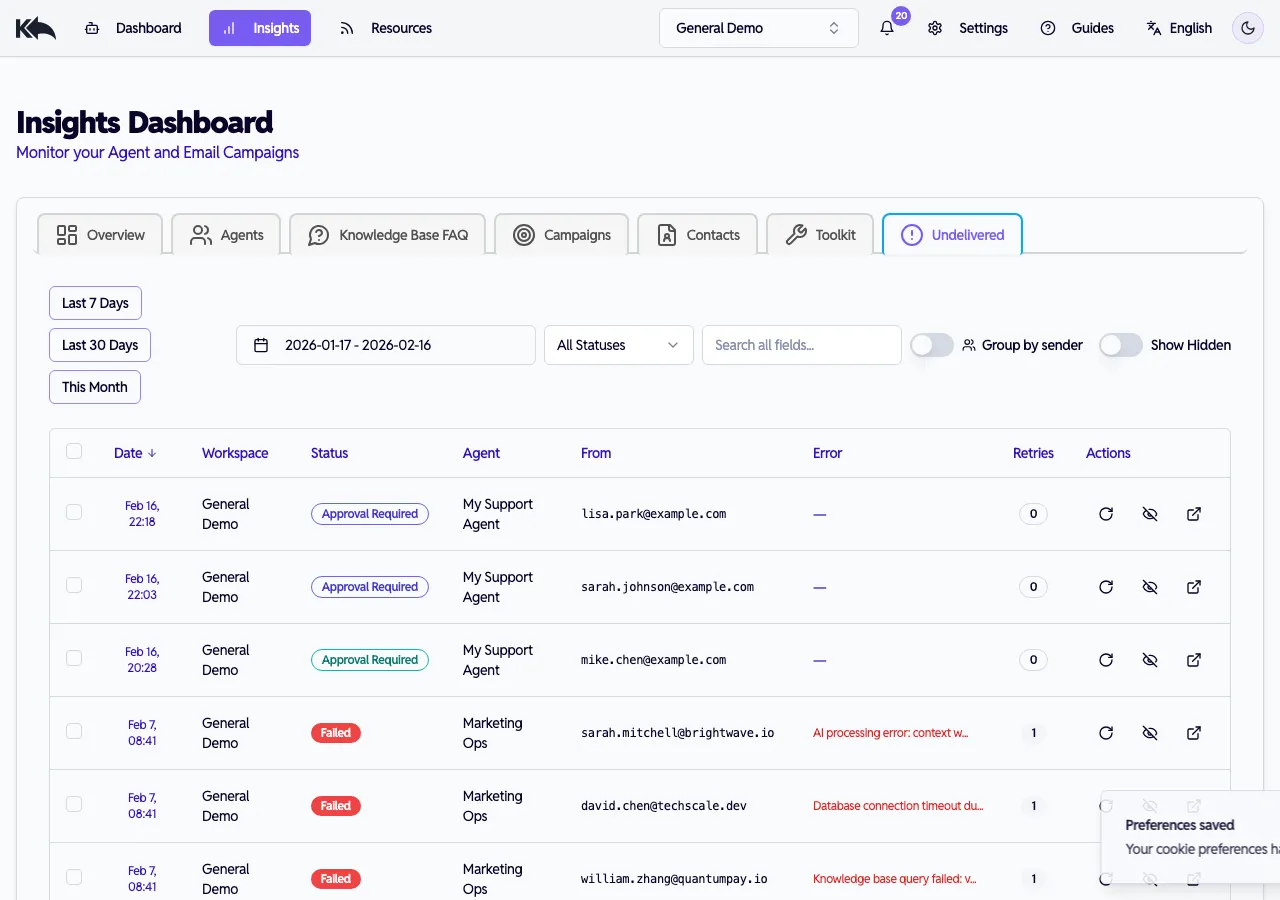
Emails awaiting review appear in Insights > Undelivered with an Approval Required status badge. You can filter, search, and sort to quickly find drafts that need attention.
Reviewing a draft
Section titled “Reviewing a draft”Click any email in the queue to open the detail view:
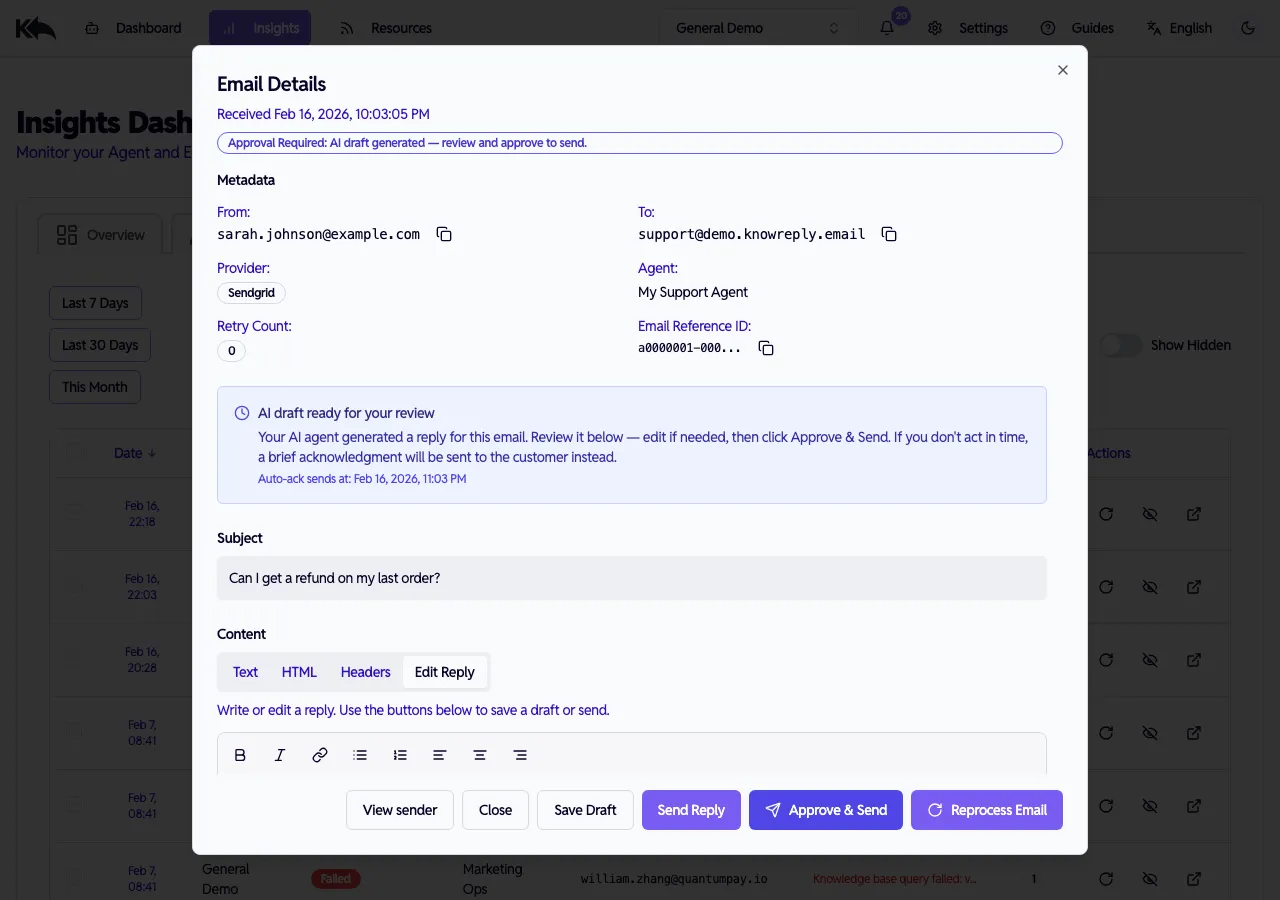
The detail modal shows:
- Status banner — Confirms the AI draft is ready for your review
- Auto-ack countdown — When the acknowledgment will be sent if you don’t act
- Metadata — Sender, recipient, provider, agent, and retry count
- Subject — The original email subject line
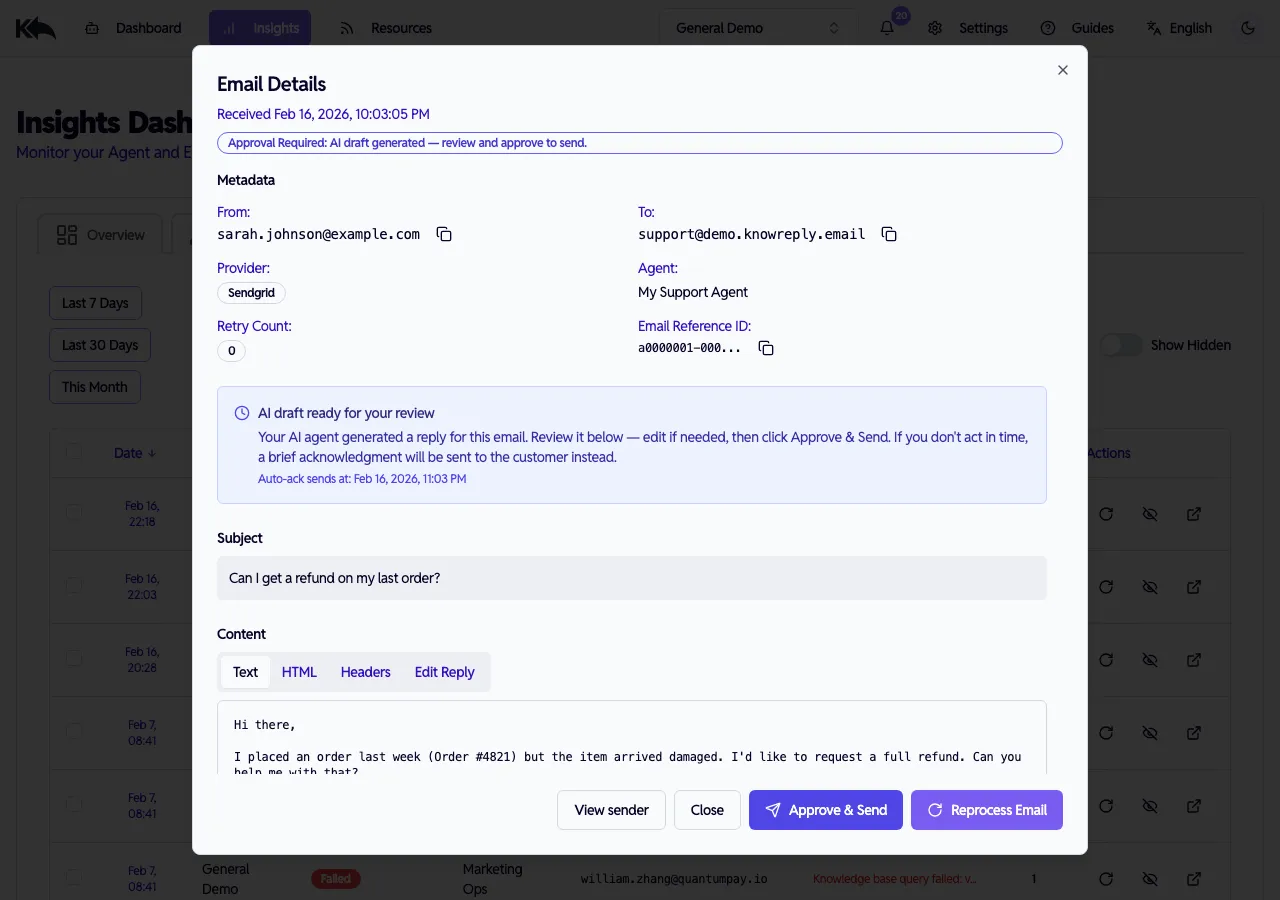
- Content tabs — Switch between the original email text, HTML, headers, and the AI-drafted reply
Viewing the original email
Section titled “Viewing the original email”Switch to the Text tab to see exactly what the customer wrote:
Editing and approving a reply
Section titled “Editing and approving a reply”The Edit Reply tab shows the AI-drafted response in a rich text editor. You can edit the reply before sending:
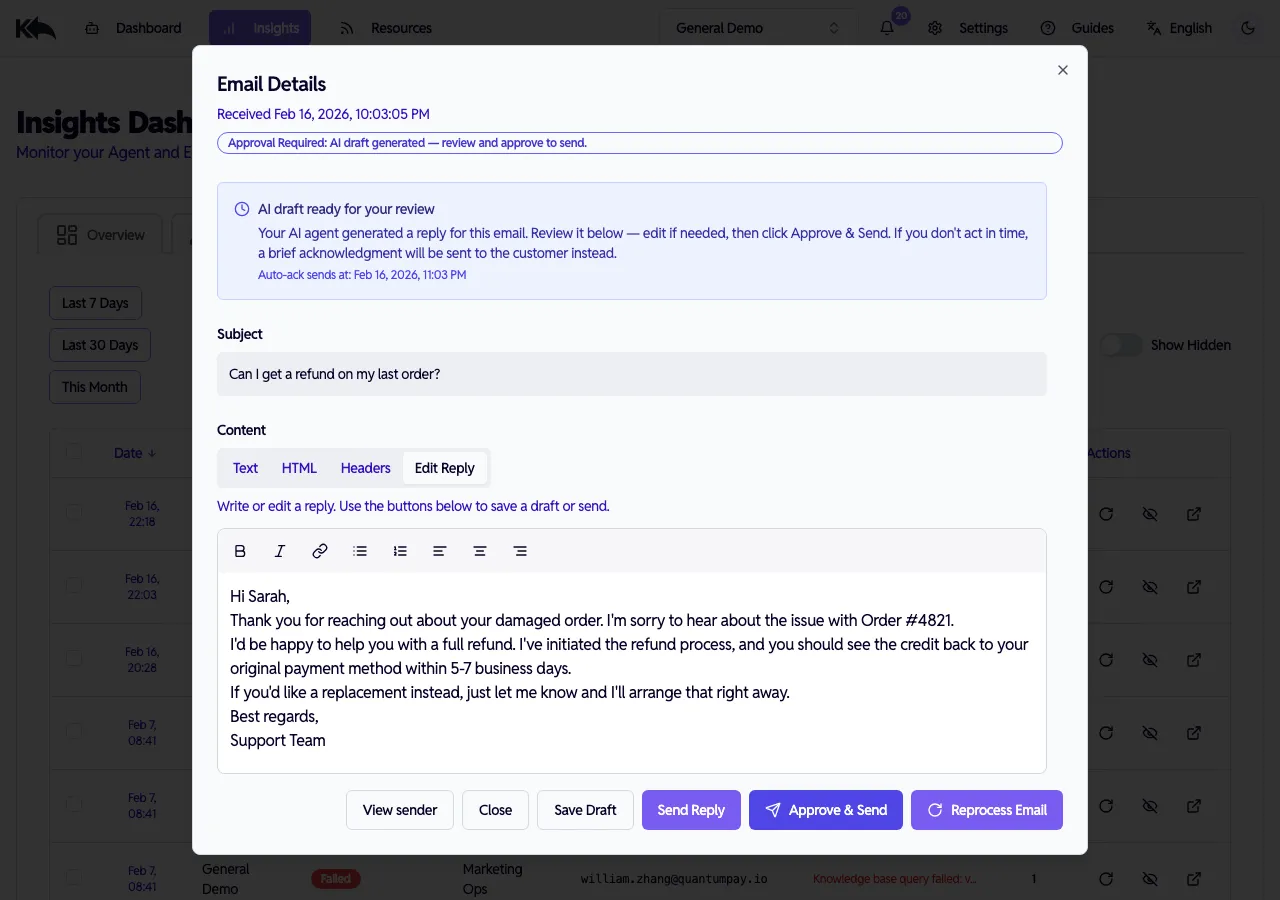
From here you can:
- Approve & Send — Send the AI draft as-is (or after editing)
- Save Draft — Save your edits without sending
- Send Reply — Send immediately
- Reprocess Email — Have the AI generate a new draft
Auto-acknowledgment
Section titled “Auto-acknowledgment”If a draft sits unreviewed, Know Reply can send a brief acknowledgment to the customer so they aren’t left waiting. This prevents the worst outcome: silence.
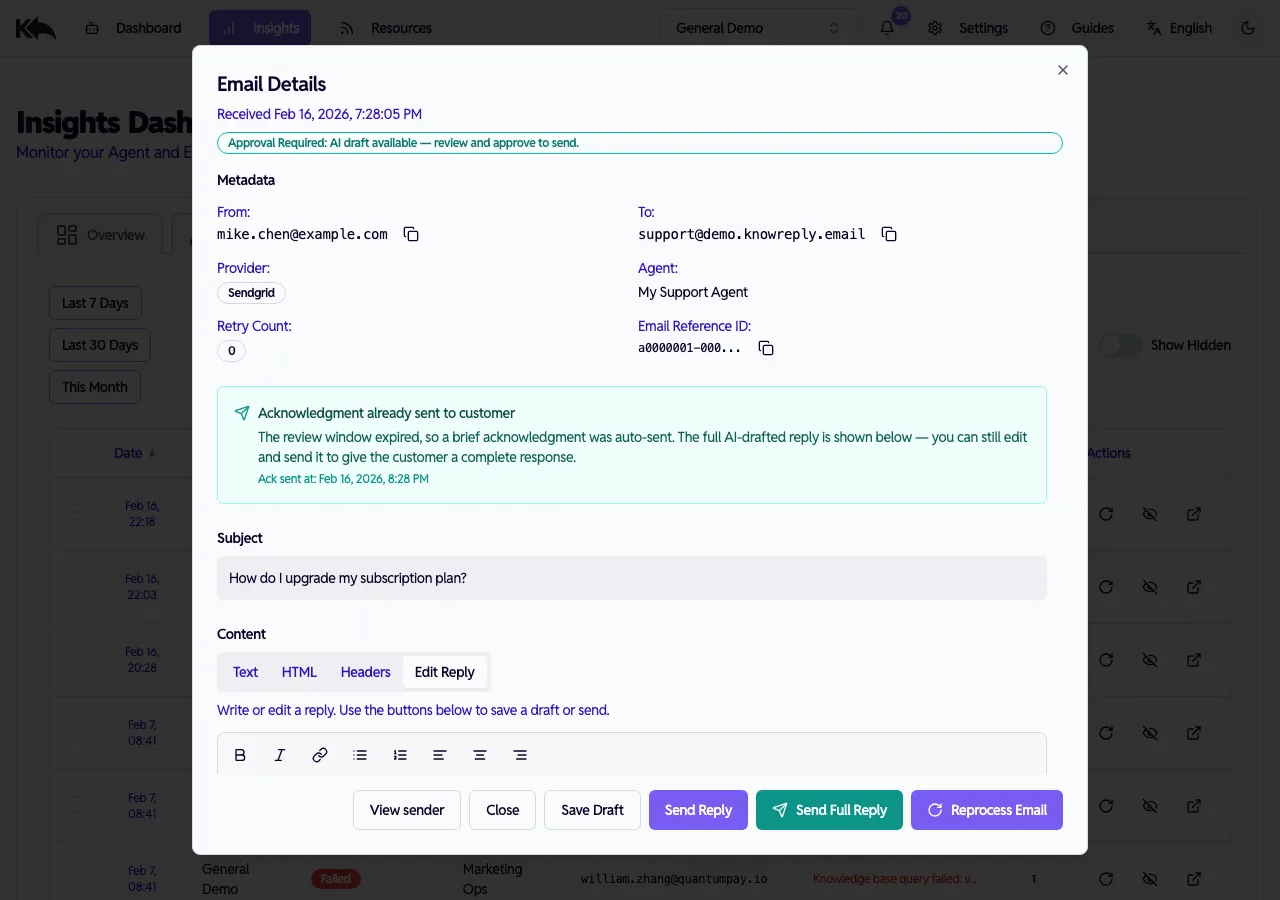
When the review window expires:
- A brief acknowledgment is auto-sent to the customer (“we received your message”)
- The banner changes to Acknowledgment already sent to customer
- The AI-drafted reply is still available — you can edit and click Send Full Reply to give the customer the complete response
- The acknowledgment is a simple “we received your message and will get back to you” — it never sends the AI draft without your approval
Auto-acknowledgment only applies to Free tier draft review. Paid plans use auto-send, so the customer always gets a real reply, not a generic acknowledgment.
Availability by plan
Section titled “Availability by plan”| Feature | Free | Starter | Pro | Premium | Enterprise |
|---|---|---|---|---|---|
| Auto-send mode | No | Included | Included | Included | Included |
| Draft review mode | Always on | Optional | Optional | Optional | Optional |
| AI replies/month | 50 | Unlimited | Unlimited | Unlimited | Unlimited |
| Auto-acknowledgment | Configurable timer | N/A | N/A | N/A | N/A |