
Sender Trust & Safety
Know Reply evaluates every inbound email before your AI agent sees it. Suspicious messages are quarantined or blocked automatically, protecting your agent from spam, phishing, and abuse.
How trust scoring works
Section titled “How trust scoring works”Each inbound email receives a trust score from 0 to 100 based on five weighted factors:
| Factor | Weight | What it measures |
|---|---|---|
| Authentication | 30% | SPF, DKIM, and DMARC pass/fail results |
| Contact match | 25% | Whether the sender is a known contact |
| Sending rate | 20% | How many emails the sender has sent recently |
| Reputation | 15% | History of safety blocks or negative escalations |
| Content risk | 10% | Structural URL risks (IP-based links, shorteners, very long URLs) |
What each score means
Section titled “What each score means”| Score | Result | What happens |
|---|---|---|
| 80–100 | Allow | Email is processed normally by your agent |
| 50–79 | Review | Email is processed but flagged in the audit log |
| 20–49 | Quarantine | Email is held for human review — agent does not process it |
| 0–19 | Block | Email is rejected immediately |
These thresholds can be adjusted by your organization for stricter or more lenient policies.
Viewing trust information
Section titled “Viewing trust information”Contact profile
Section titled “Contact profile”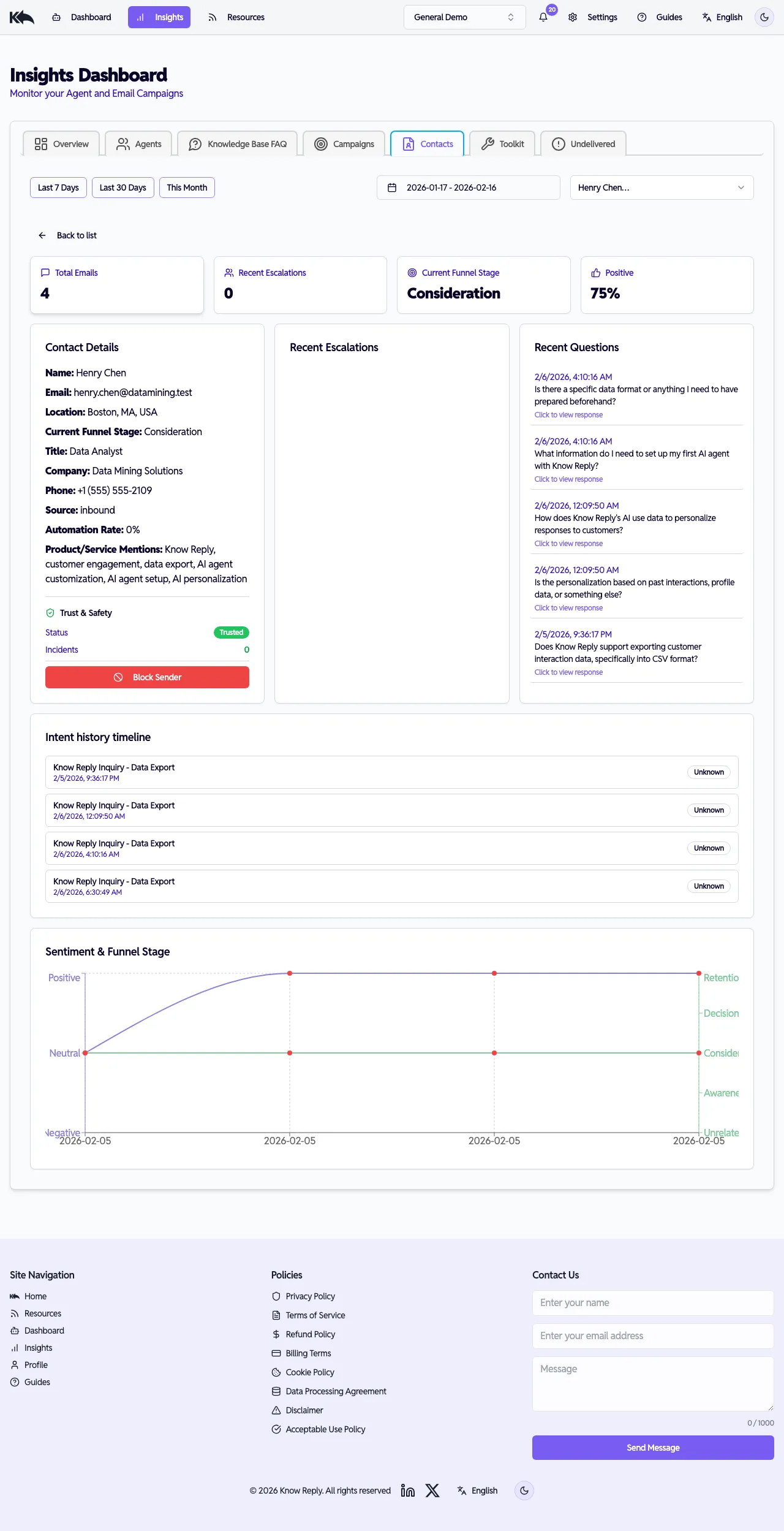
When you view a contact in Insights > Customers, their profile includes a Trust & Safety section showing:
- Trust status badge — green (Trusted), amber (Low Trust), or red (Blocked)
- Trust incidents — count of safety blocks and negative escalations
- Recent trust events — a timeline of content risk flags, content blocks, and negative escalations
- Last email result — what happened with their most recent email (Allow, Review, Held - Low Trust, Blocked)
Undelivered dashboard
Section titled “Undelivered dashboard”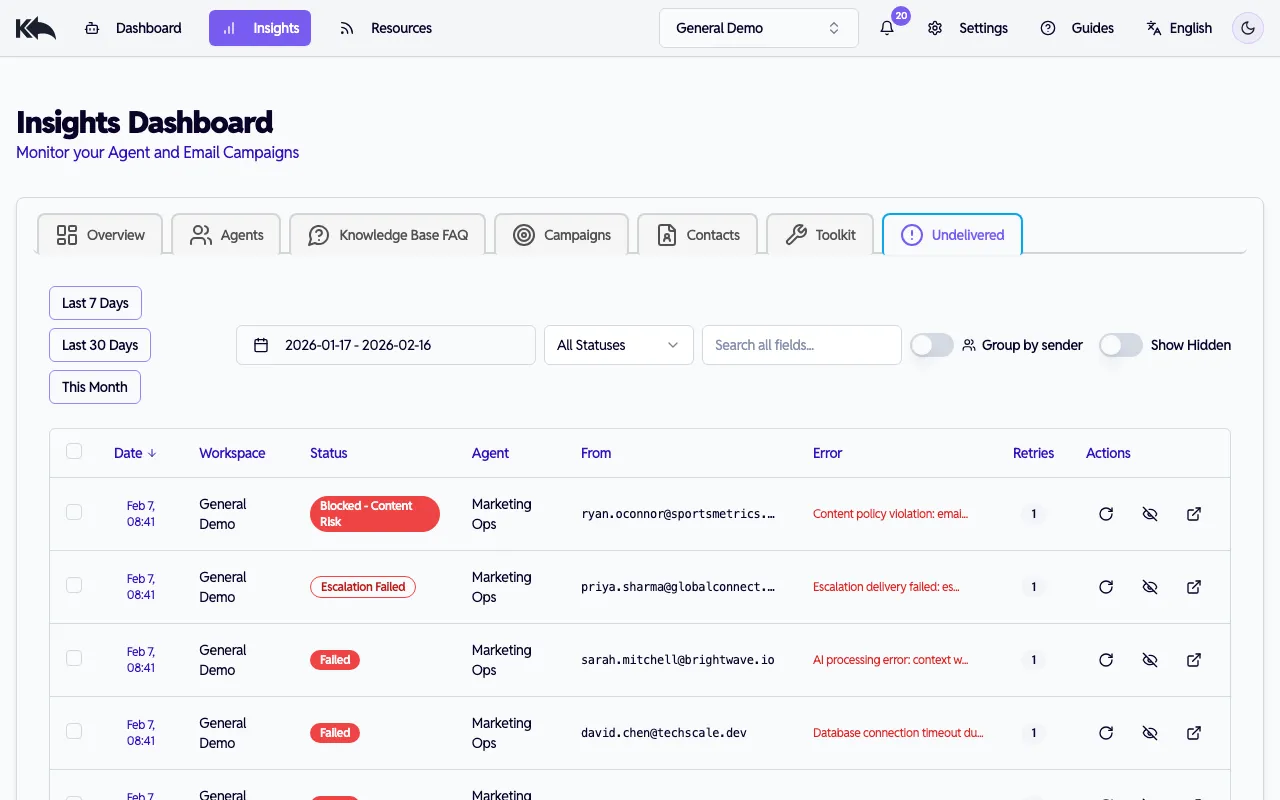
The Insights > Undelivered dashboard shows all emails that weren’t delivered to your agent, including trust-related holds:
- Held - Low Trust — trust score fell below the quarantine threshold
- Blocked - Untrusted Sender — trust score fell below the block threshold
- Blocked - Rate Limited — sender exceeded the hourly rate limit
- Blocked - Content Risk — sender hit the lifetime incident threshold
Blocking and unblocking senders
Section titled “Blocking and unblocking senders”You can manually block any sender to prevent all future emails from reaching your agent.
To block a sender
Section titled “To block a sender”- Go to Insights > Customers
- Select the contact
- In the Trust & Safety section, click Block Sender
- Confirm in the dialog
Blocked senders are immediately rejected — no AI processing occurs. The block applies to your current workspace only.
To unblock a sender
Section titled “To unblock a sender”- Go to Insights > Customers
- Select the blocked contact (shown with a “Blocked” badge)
- Click Unblock Sender
The sender’s emails will be evaluated normally again using the trust scoring system.
Clearing trust incidents
Section titled “Clearing trust incidents”If a sender has accumulated negative trust events (safety blocks, negative escalations) that are no longer relevant, you can reset their reputation:
- Go to Insights > Customers
- Select the contact
- Click Clear Trust Incidents
- Confirm the action
This returns their reputation score to the baseline (70) and removes all recorded incidents. Emails already in the Undelivered queue are not affected.
Grouped sender view
Section titled “Grouped sender view”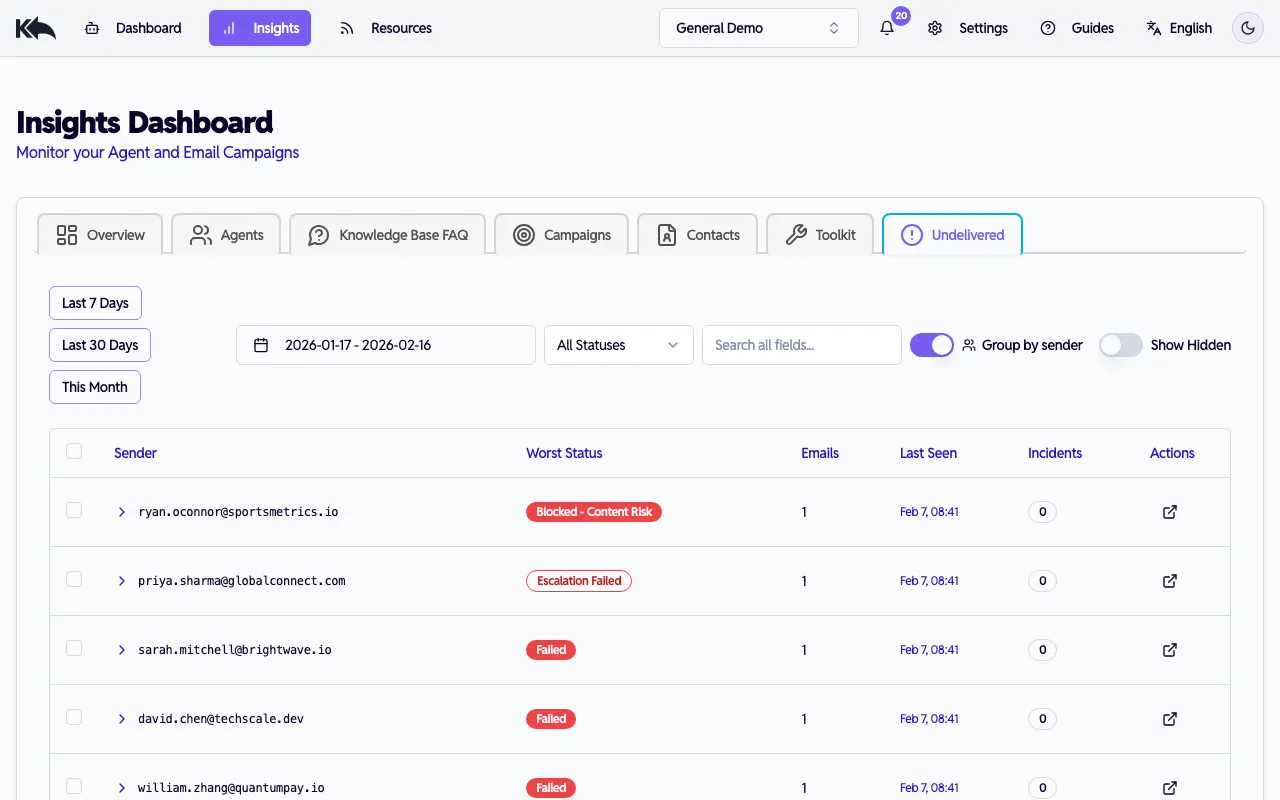
In the Undelivered dashboard, toggle Group by sender to see patterns:
- Emails are grouped by sender address
- Each group shows the worst status, incident count, and most recent email
- Expand a group to see individual emails
- Click a sender’s email address to navigate to their contact profile
This helps you quickly identify repeat offenders or senders that need attention.
Rate limiting
Section titled “Rate limiting”Know Reply limits how many emails a single sender can send per hour to your workspace. The default is 20 messages per hour with a burst limit of 5 per minute.
When a sender exceeds the rate limit, their emails are blocked with a Rate Limited status until the window resets.
Automatic reputation tracking
Section titled “Automatic reputation tracking”The trust system learns from your agent’s experience:
- Content safety blocks reduce a sender’s reputation score
- Negative escalations (flagged during agent processing) also reduce reputation
- Multiple incidents compound — two safety blocks have a larger penalty than one
- Only the last 30 days of events are considered, so reputation recovers over time
Notifications
Section titled “Notifications”When an email is quarantined (held for review), your workspace receives a notification so you can take action. Definitively blocked emails (blocked, rate limited, content blocked) do not trigger notifications since no action is needed.